




Choosing the right software can significantly affect a business’s productivity, operating costs, security, and ability to grow. While some businesses prefer cloud-based applications that are accessible online, others rely on traditional software installed on local computers or company servers.
Understanding SaaS vs Traditional Software helps businesses determine which solution best matches their budget, technical resources, and operational requirements. Both models have advantages and limitations, so the right choice depends on how your organization works.
In this guide, we’ll explore the difference between SaaS and traditional software, compare their costs, security, maintenance, and scalability, and explain when each option makes the most sense.
What Is SaaS (Software as a Service)?
Software as a Service (SaaS) is a software delivery model in which applications are hosted by a service provider and accessed over the internet. Instead of managing the underlying infrastructure, users typically access the software through a web browser or dedicated application.
Most SaaS products use a subscription-based pricing model, allowing businesses to pay monthly or annually. The provider generally manages hosting, infrastructure maintenance, and software updates.
Popular SaaS software examples include Google Workspace for productivity, Salesforce for customer relationship management, Slack for team communication, and Dropbox for cloud storage.
Key Features of SaaS Software
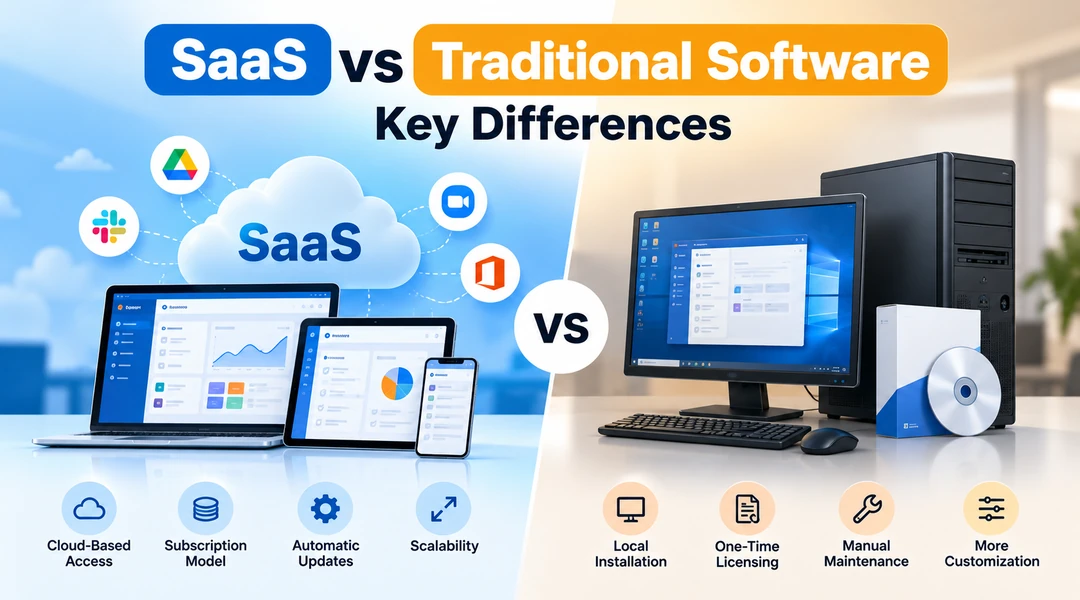
- Cloud-based access: Use applications from different locations and supported devices.
- Subscription-based pricing: Pay recurring fees rather than making a large initial software purchase.
- Automatic updates: Receive improvements and security patches managed by the provider.
- Scalability: Add users or change subscription plans as business needs evolve.
- Software integration: Connect compatible applications through built-in integrations or APIs.
These features make SaaS particularly useful for startups, small businesses, and distributed teams that need accessible software without managing extensive IT infrastructure.
What Is Traditional Software?
Traditional software typically refers to applications installed on individual computers or deployed on an organization’s own servers. Depending on the product, businesses may purchase a perpetual licence, pay recurring maintenance fees, or use another licensing arrangement.
In an on-premise deployment, the organization manages the infrastructure where the application runs. Desktop applications may operate locally, while server-based systems can support multiple users across an internal network.
Examples include locally installed desktop applications, certain legacy accounting systems, specialized engineering tools, and business applications deployed on company servers.
Key Features of Traditional Software
- Local installation: Software is installed on supported devices or company infrastructure.
- Greater operational control: Organizations can manage their environments and configurations.
- Customization: Some systems allow extensive modifications to suit specialized workflows.
- Offline access: Locally installed applications may continue working without an internet connection.
- Maintenance responsibilities: Businesses may need to manage updates, backups, compatibility, and security.
Traditional software can be a suitable option for organizations with specialized requirements, existing infrastructure, or a strong need to control their computing environment.
SaaS vs Traditional Software: Key Differences
The main difference between SaaS and traditional software is how applications are hosted, accessed, maintained, and paid for. The following comparison highlights the factors businesses should consider.
| Comparison factor | SaaS software | Traditional software |
| Deployment | Hosted by a service provider | Installed locally or deployed on company servers |
| Pricing | Usually monthly or annual subscriptions | Licence fees, subscriptions, or other licensing models |
| Initial investment | Generally lower upfront costs | May require higher initial spending |
| Accessibility | Usually available online across supported devices | Often tied to installed devices or an internal network |
| Maintenance | Provider manages much of the infrastructure and updates | Organization may manage updates and infrastructure |
| Scalability | Users and plans can often be adjusted quickly | Expansion may require additional licences or hardware |
| Customization | Depends on the product and subscription plan | Can offer deeper control in some deployments |
| Data management | Data is commonly hosted by the provider | Data may be stored on local devices or company servers |
| Internet dependency | Many features require internet access | Local applications can often work offline |
| IT resources | Usually requires less infrastructure management | May require dedicated technical resources |
Neither model is automatically better in every situation. A business should compare the software’s actual features, service terms, security controls, and long-term costs before making a decision.
1. Cost of SaaS vs Traditional Software
Cost is one of the most important factors in a SaaS software comparison. However, looking only at the purchase price or monthly subscription can lead to an incomplete decision.
SaaS typically requires a smaller initial investment because businesses do not need to purchase and maintain all the underlying infrastructure themselves. Subscription plans can also make expenses easier to budget for, although fees may increase as usage, user numbers, or feature requirements grow.
Traditional software may require upfront spending on licences, hardware, installation, implementation, and IT support. Some licensing models offer long-term value, but maintenance, upgrades, backups, and infrastructure replacement can add significant expenses.
To compare the cost of SaaS vs traditional software, calculate the total cost of ownership (TCO) over a period of three to five years. Include licence or subscription fees, implementation, training, maintenance, integrations, security, and potential migration costs.
2. Installation and Accessibility
Cloud-based software vs traditional software differs significantly in how users access applications.
With SaaS, users generally sign in through a browser or supported application. This makes it easier for employees working from different locations to access shared information and collaborate, provided they have the required permissions and connectivity.
SaaS can also simplify deployment because users may not need individual installations. However, organizations still need to configure accounts, permissions, integrations, and security settings.
With SaaS vs installed software, traditional desktop applications usually require installation on compatible devices. Server-based applications may also require network configuration and infrastructure setup. This can provide greater control over the deployment environment but may take more time to manage across a large organization.
3. Maintenance and Software Updates
Maintenance is another major difference between SaaS and traditional software.
SaaS providers typically manage application updates, hosting infrastructure, and many routine maintenance tasks. Businesses can therefore spend less time maintaining the underlying platform. However, administrators still need to manage user access, data permissions, integrations, and account security.
Traditional software often requires organizations to install updates, test compatibility, maintain hardware, and arrange backups. These responsibilities may demand additional staff or external IT support.
For businesses with limited technical resources, SaaS can reduce maintenance overhead. Organizations with an established IT team may prefer the control offered by managing their own systems.
4. SaaS vs Traditional Software Security
Security should be evaluated according to the application’s design, the data being processed, and the organization’s ability to manage risk.
SaaS providers may offer encryption, multi-factor authentication, monitoring, backups, and security updates. Nevertheless, businesses must review the provider’s security practices, access controls, incident response procedures, data residency options, and compliance documentation.
Traditional software can allow organizations to keep data within their own infrastructure and apply internal security policies. However, local deployment does not automatically make software more secure. The organization must maintain appropriate access controls, patch vulnerabilities, protect backups, and monitor its systems.
When evaluating SaaS vs traditional software security, consider who is responsible for each security task, how sensitive information is protected, and whether the solution meets your legal and regulatory obligations.
5. Scalability, Customization, and Integration
SaaS platforms are often designed to scale with changing business requirements. Organizations may be able to add users, upgrade plans, or activate features without purchasing new physical servers. Many products also provide integrations that connect sales, marketing, finance, and customer support workflows.
Traditional software may offer greater customization when the organization controls the application code or deployment environment. This can be valuable for complex workflows or systems that must connect with legacy infrastructure. However, customization may require specialist developers and ongoing maintenance.
SaaS platforms can also have customization limits, while traditional systems can face integration challenges. Compare the capabilities of specific products rather than assuming that one model always offers more flexibility.
SaaS vs Traditional Software: Pros and Cons
Advantages of SaaS over Traditional Software
- Lower initial infrastructure investment in many cases.
- Convenient access for remote and distributed teams.
- Provider-managed hosting and routine software updates.
- Flexible user plans and simpler scaling.
- Easier integration with compatible cloud-based applications.
Disadvantages of SaaS Compared to Traditional Software
- Recurring subscription fees can accumulate over time.
- Internet outages may interrupt access to important features.
- Data storage and some security responsibilities depend on the provider.
- Customization may be restricted by the product or plan.
- Switching providers can be difficult if data export or migration is limited.
Advantages of Traditional Software
- Greater control over local infrastructure and deployment.
- Potentially better support for offline workflows.
- More customization options in some systems.
- Direct control over data storage when deployed on company infrastructure.
Disadvantages of Traditional Software
- Higher upfront hardware, licensing, and implementation costs may apply.
- Updates and maintenance can require additional IT resources.
- Scaling may involve purchasing equipment or licences.
- Backup, disaster recovery, and security require careful management.
Which Is Better: SaaS or Traditional Software for Small Businesses?
For many small businesses, SaaS is a practical starting point because it offers quick access to business tools without requiring extensive infrastructure. A small company can use cloud-based accounting, customer relationship management, project management, or communication software and adjust its plans as it grows.
Traditional software may be more appropriate when a business needs reliable offline operation, specialized customization, control over its deployment environment, or compatibility with existing systems.
The best option depends on the specific application, the team’s technical expertise, the sensitivity of the data, and the available budget. Businesses should also check contract terms, data export options, service availability, and future migration requirements.
When to Choose SaaS vs Traditional Software
Choose SaaS when your priorities include remote accessibility, fast deployment, provider-managed maintenance, and flexible scaling. It is often a good fit for startups, growing companies, and teams that rely on collaboration across locations.
Choose traditional software when your organization needs a locally controlled environment, dependable offline operation, specialized customization, or integration with established on-premise systems.
Some businesses benefit from a hybrid approach. They may use SaaS for collaboration and customer management while retaining locally deployed systems for specialized operations or data that must remain within a controlled environment.
Before committing, compare the available products, calculate the total cost of ownership, review security requirements, and confirm that the solution can support your future needs.
Frequently Asked Questions
What is the difference between SaaS and traditional software?
SaaS is generally hosted by a provider and accessed online, often through a subscription. Traditional software is commonly installed on local devices or deployed on company servers, with licensing and maintenance arrangements that vary by product.
Is SaaS cheaper than traditional software?
SaaS often has lower upfront costs, but recurring subscriptions can add up. Traditional software may cost more initially while offering different long-term economics. Compare total cost of ownership rather than just the initial price.
Is SaaS more secure than traditional software?
Neither model is automatically more secure. SaaS security depends partly on the provider’s controls and the customer’s account configuration, while traditional deployments depend heavily on the organization’s infrastructure and security practices.
Can traditional software work without the internet?
Many locally installed applications can work offline, although some features may still require internet access. The answer depends on the application and its licensing or activation requirements.
Can a business switch from traditional software to SaaS?
Yes. Businesses can migrate to SaaS, but they should plan for data migration, integrations, employee training, access permissions, and possible downtime. Confirm that the new provider supports the required data formats and export options.